In today’s interconnected world, managing a large network of devices efficiently is crucial for businesses to stay ahead. However, the traditional method of individually handling operations on each device can be time-consuming and labor-intensive. Whether it’s updating firmware across deployment locations, executing power actions on multiple devices, or implementing device policies, the need for streamlined operations cannot be overstated. This is where signageOS Bulk Actions step in to simplify device management processes, saving time and effort while ensuring precision and control.
What is signageOS Bulk Action?

At the heart of signageOS Bulk Actions is the ability to perform simultaneous tasks across multiple devices or batches of devices. This feature, integrated into the signageOS CloudControl platform, offers a solution for managing device operations at scale. Whether you’re overseeing digital displays, kiosks, or other IoT devices, Bulk Actions simplifies complex tasks into manageable steps, ensuring operational efficiency and effectiveness.
How to Use Bulk Action
Let’s dive into a quick guide on how to leverage signageOS Bulk Action
Device Selection
Begin by selecting specific devices from your network within the Box platform under the Devices tab. Utilize filters to refine your device selection criteria. Once you’ve made your selections, click on the Bulk Action button located in the top-right corner.
Action Configuration
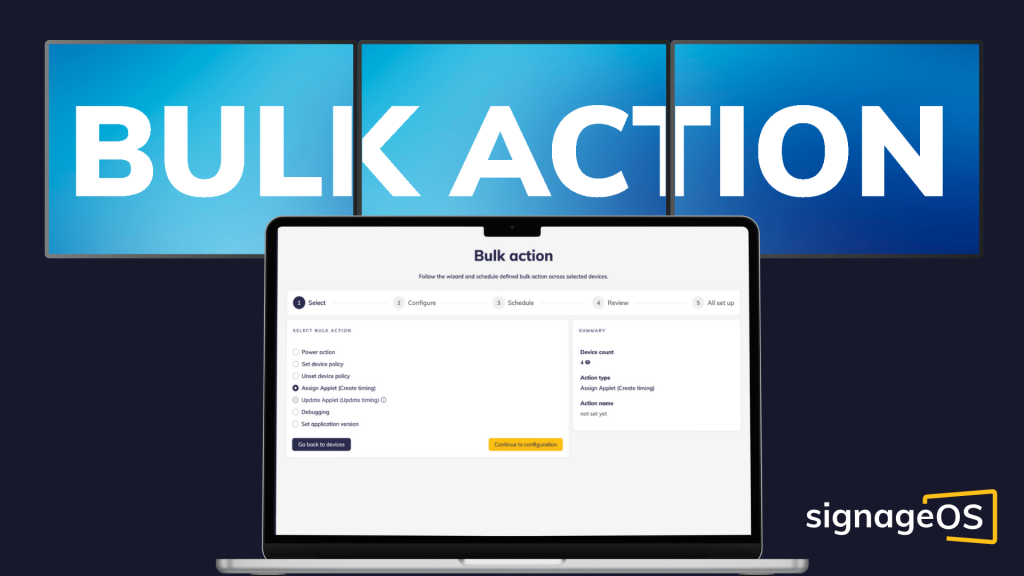
After confirming your device selection, you’ll be guided through a wizard interface to configure your bulk action. Choose from a range of operations, such as Power Action, Set/Unset device policies, Assign/Update applets, or Debugging tasks.
Operation Customization and Scheduling
Proceed to customize your selected operation in detail. You can set specific policies, applet configurations, or debugging options as per your requirements. Choose to execute the operation immediately or schedule it for a later time with timezone flexibility, ensuring optimal device management across different geographical locations.
Batches and Overview
Use the batching feature to break down your operation into smaller groups, improving execution reliability and minimizing the chance of widespread errors. Within this feature, you will also discover the Error Threshold option, which is essential for setting specific limits that must be met or exceeded during bulk actions to prevent errors across all devices. Adjusting this threshold according to your operational requirements will improve operational efficiency.
Before proceeding with the final execution, review the overview of your configured operation, selected devices, and execution details to ensure they align with your intended settings.
Monitoring and Management
Upon execution, monitor the progress of your Bulk Action in real-time. Track its status— whether Scheduled, In progress, Waiting, Paused, Stopped, Finished, or Archived – through the Bulk Actions list. Access detailed information as needed, ensuring precise control and oversight throughout the process.
Why is Bulk Action Crucial for Businesses?
The power of signageOS Bulk Actions lies in its ability to centralize and automate repetitive tasks, reducing manual intervention and potential errors. With features like scheduled operations, detailed progress monitoring, and real-time updates, users can maintain granular control over device management processes while optimizing resource utilization.
Conclusion
signageOS Bulk Actions represent an innovative shift in device management, offering efficiency, scalability, and control over network devices. By harnessing the power of automation, scheduling, and batch management, organizations can streamline operations, reduce downtime, and ultimately enhance the overall user experience across their digital ecosystems.
To delve deeper into the capabilities of signageOS Bulk Actions and witness firsthand how it can transform your organization’s device management landscape, consider scheduling a personalized demo. Our experts are ready to guide you through the implementation process, showcase advanced features, and address specific use-case scenarios tailored to your industry and operational needs.
Embrace the future of device management with signageOS Bulk Actions, where complexity meets simplicity and productivity soars to new heights. For more detailed insights on this feature,visit signageOS Doc .


 News
News 
Leave a comment