In 2018, signageOS released the first version of it’s operating system for the Raspberry Pi. While there were many interesting challenges we faced during its development, the goal of this article is to focus on one particular problem that resulted in a new open source project.
The Raspberry Pi compute module
You’ve probably heard about the Raspberry Pi before, and you know it looks something like this:
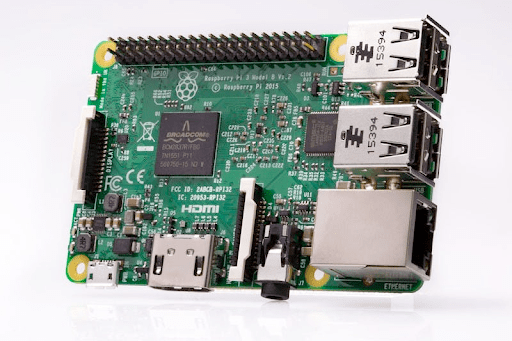
This is a standard Raspberry Pi 3 Model B.
What you may not know, though, is that the Raspberry Pi can also look like this.
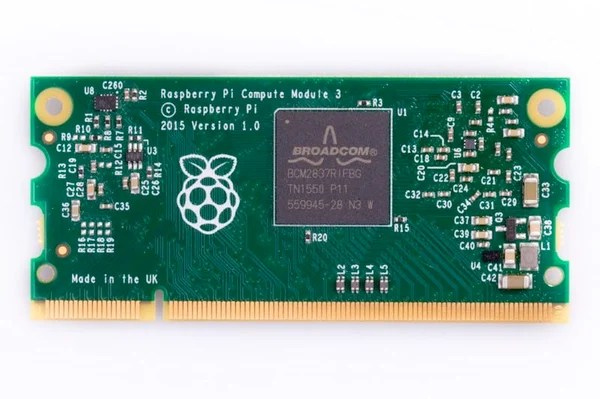
That’s the Raspberry Pi Compute Module 3.
“The Compute Module 3 is a Raspberry Pi 3 in a more flexible form factor, intended for industrial applications.”
One of the major players in digital signage – NEC Display Solutions, has adopted the compute module and allows seamless integration with their displays, using the compute module as the digital signage display’s “brains”.
Controlling the NEC display
NEC allows developers and administrators to control the displays via a special API. It can be accessed either via LAN or RS232.
First step: GUI
The easiest way to use this capability is via the NEC PD Communications Tool (NEC Public Display Communication Tool), which is a GUI that implements API calls, allowing you to access and control NEC displays that support it. It’s a good starting point to get an idea of how communication works. You can even open the communication log and inspect the bytes that are being sent. However, this is only good for manual work. In signageOS, we need to do this programmatically.
Second step: Python SDK
The protocol that this communication implements can look a little complicated. However, you don’t have to implement the entire protocol from scratch. NEC has already created a Python SDK that does all of the heavy lifting. It implements most of the features and allows you to communicate via both LAN and RS232.
This library is indeed where we started. Our main app isn’t written in Python but in Node.js, so we used the Python library to write command-line scripts that would get executed by the main Node.js program. This quickly became inconvenient, so in the end, we decided to rewrite the library into Node.js.
Node.js SDK
Requirements
- Make sure that UART is enabled and properly configured.
- Enable monitor control in the compute module settings on the NEC display. If it’s not enabled, the display will reject communication from the compute module.
Getting started
Install @signageos/nec-pd-sdk package:
npm install @signageos/nec-pd-sdk
Then write this code, which will confirm that everything is configured properly:
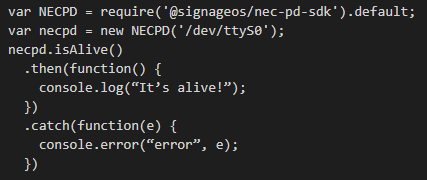
If you get “It’s alive!” in the output, it works. Otherwise check the requirements again.
NECPD is the main class that abstracts various features of the display. It expects the path to the UART device in the constructor. Raspberry Pi 3 has two UARTs available. We will be using /dev/ttyS0.
Get/Set parameter
You can get various parameters from the display to check it’s current state. For example:
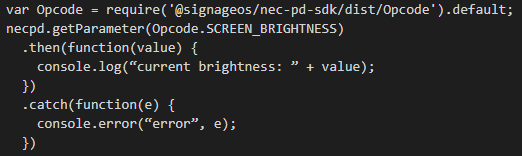
This code will tell you what the current brightness setting is. Then you can try changing it.
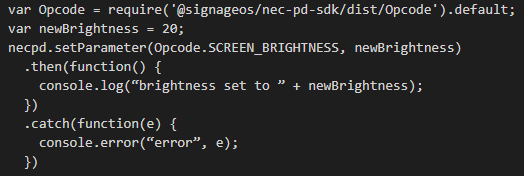
Other methods
NECPD implements other methods. You can see more examples in the project’s repository under examples
Next steps
At the time of writing this text, the library was in version 0.2.0. That suggests that it’s a work in progress. We haven’t implemented the entire API, only the methods that we needed for our use-case.
If you like this project and have suggestions on how to make it better or if you find bugs, you can report issues on the project’s GitHub page.
If you’d like to contribute your own code to the project, that’s even better. Feel free to create a pull request.


 News
News 
Leave a comment